Saved locally in data/invoices.json and exported to Excel/CSV
Invoice #
Date
Customer
Phone
Products
Total
Balance
Current Status
Actions
Select Offer / Deal Template
Choose a pre-made promotion or customize your own message
Note: {customer} will be replaced with customer's name automatically.
Send to Customer
Tap customer to launch personalized WhatsApp deal
Data Storage & Google Sheets Sync
✓
Database & Browser Storage Active
All customer bills and details are safely stored in your system and can be exported anytime directly into Excel or Google Sheets.
📊 Google Sheets Direct Auto-Sync
⚪ Not Connected
All customer details, phone numbers, prescriptions, and billing amounts are automatically added to your Google Sheet rows in real time!
⚡ 4 Easy Steps to Connect Your Google Sheet (No Linked App Needed):
Open your Google Sheet or create one at sheets.new
At the top menu, click Extensions → Apps Script.
Delete all existing text in the box, paste the code snippet below, and click Save (Floppy disk icon).
Click Deploy → New Deployment:
• Select type: Web app • Execute as: Me • Who has access: Anyone • Click Deploy, copy the Web app URL, and paste it in the box above!
function doPost(e) {
  try {
    var sheet = SpreadsheetApp.getActiveSpreadsheet().getActiveSheet();

    // Auto-create header on row 1 if sheet is empty
    if (sheet.getLastRow() === 0) {
      sheet.appendRow([
        "Invoice No", "Date", "Customer Name", "Phone / WhatsApp", "Prescription",
        "Products / Items", "Subtotal (₹)", "Discount (₹)", "Grand Total (₹)",
        "Advance Paid (₹)", "Balance Due (₹)", "Payment Mode", "Status", "Added At"
      ]);
      sheet.getRange(1, 1, 1, 14).setFontWeight("bold").setBackground("#e0f2fe");
    }

    var data = JSON.parse(e.postData.contents);
    var list = Array.isArray(data) ? data : [data];

    for (var i = 0; i < list.length; i++) {
      var item = list[i];
      var products = (item.items || []).map(function(p) {
        return p.name + ' (x' + p.qty + ' @ ₹' + p.price + ')';
      }).join('; ');

      sheet.appendRow([
        item.id || '',
        item.date || '',
        item.customer || '',
        item.phone || '',
        item.presc || 'None',
        products,
        item.subtotal || 0,
        item.discount || 0,
        item.grandTotal || 0,
        item.advance || 0,
        item.balance || 0,
        item.paymentMode || '',
        item.status || 'In Lab',
        new Date().toLocaleString('en-IN', { timeZone: 'Asia/Kolkata' })
      ]);
    }

    return ContentService.createTextOutput(JSON.stringify({ result: "success", count: list.length }))
      .setMimeType(ContentService.MimeType.JSON);
  } catch (error) {
    return ContentService.createTextOutput(JSON.stringify({ result: "error", error: error.toString() }))
      .setMimeType(ContentService.MimeType.JSON);
  }
}
🔐
Access Control & User Credentials
Manage logins, emails, passwords & data access file (data/users.json)
➕ Grant Access / Add New Manager or Staff
Active Authorized Users1 User
User
Email
Password
Role
Action
Local File: data/users.json
Edit user emails and passwords directly in raw format. Both local Node file and browser storage update instantly.
Press "Save Raw Users File" to apply changes
Customer Bill Preview
• GSTIN: 20ADBPP8636R1Z2 • COMPOSITE DEALER
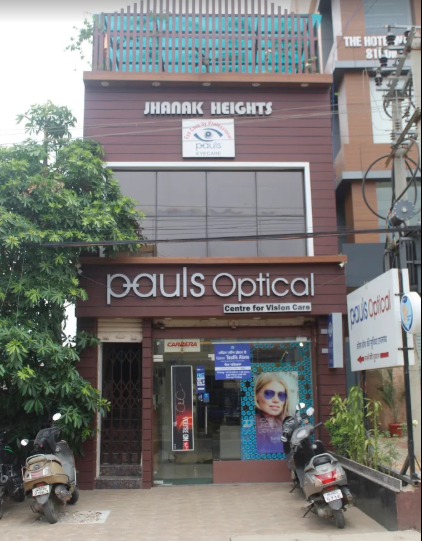
📍 Jhanak Heights, Opp - Gokul Sweets, Kanke Road,
Ranchi • Mob: 9661053535
📍 Opp - Krishi Bhawan, Beside Prem Medical Hall, Kanke Road, Ranchi • Mob: 9570000077
BILL OF SUPPLY
BOS No:POP/1021
Customer:Rahul Sharma
WhatsApp:+91 9876543210
Date:29 Oct 2026
Ready In:3 Days
Payment Mode:UPI
Status:Delivered & Paid
👁️ Refraction Report
TYPE
SPH
CYL
AXIS
VISION
D.V
RE
-
-
-
-
LE
-
-
-
-
NV Add
RE
-
-
-
-
LE
-
-
-
-
Remarks:
SN.
Product
Description
HSN
QTY
UOM
Rate
Amount
Discount
Net Amount
Payment Details
Date
Mode
Amount
Net Outstanding Balance
₹0
Subtotal:₹0
Discount:-₹0
Grand Total:₹0
Advance Paid:₹0
Balance Due:₹0
WhatsApp Broadcast to All Customers
Send editable promotion/offer to all contacts in 1 click
Tag: {customer}
Recipients (0 customers)
|
Sending: 1 of 5 to Rahul Sharma...
📍Jhanak Heights, Kanke Road, Ranchi
Pauls Optical
Centre for Vision Care • Complete Eyecare & Eyewear Solutions

 GSTIN : 20ADBPP8636R1Z2